Free Scribd Downloader
Download Scribd documents that are public: preview them in the official viewer, then save the original PDF when allowed, the details as TXT or the JPG cover.
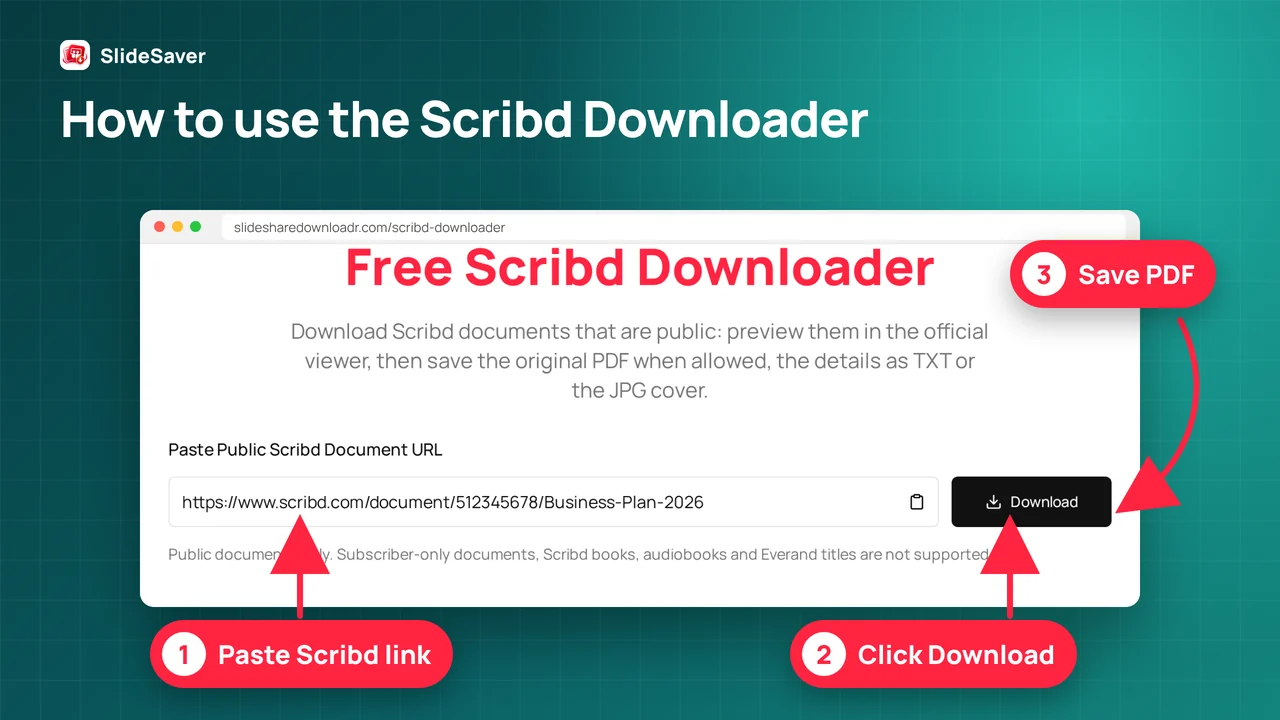
How to use the Scribd downloader
- Step 1
Paste a public Scribd link
Copy the address of a scribd.com/document/… page and paste it into the box.
- Step 2
We check public access
We read Scribd's public page data to confirm the document is free to read. Subscriber-only items are refused.
- Step 3
Preview in the official viewer
Read the document in Scribd's embedded viewer right on this page.
- Step 4
Pick what to save
Save the TXT details, the JPG cover, a citation, or the original PDF via Scribd's own Download button.
Why use this free Scribd downloader
Public-only check
We read Scribd's own public flag and refuse anything else.
Official viewer
Read the document in Scribd's embedded viewer on this page.
TXT & citation
One-click details file and a ready-to-paste citation.
No sign-up
No account, no extension, no watermark.
Which format fits?
| Format | Choose it when… |
|---|---|
| Original PDF / DOCX | The uploader allows downloads; we link to Scribd's own button. |
| TXT details | You need the title, author, description and link for notes. |
| JPG cover | You want the public first-page preview image. |
| Citation | You need to credit the author in one line. |
Supported Scribd links
https://www.scribd.com/document/123456/titlehttps://www.scribd.com/doc/123456https://www.scribd.com/presentation/123456/titlehttps://www.scribd.com/embeds/123456/content
- Book, audiobook and Everand links (subscription content)
If something goes wrong
| Problem | Fix |
|---|---|
| Not a Scribd link | Paste the full scribd.com document address. |
| Subscriber-only | The document isn't free to read; open it on Scribd. |
| Scribd blocked our request | Use the official viewer shown, or try again later. |
| Blank or blurred pages | Scroll slowly, allow scribd.com in your blocker, or reload. |
| Not found | The uploader deleted it or made it private. |
Fair use
Why use a Scribd PDF downloader
Use this Scribd document downloader online when you want to download Scribd documents that are public: preview first in the official viewer, then keep the details, the cover or the original PDF when the uploader allows it.
FAQ
Is this Scribd downloader free?
Yes. It is free, needs no account and adds no watermark.
Can I download Scribd documents as PDF?
Yes, when the uploader enabled downloads: we link you to Scribd's own Download button for the original PDF or DOCX. Otherwise you can read it in the official viewer and save the details.
Can I download premium or subscriber-only documents?
No. If Scribd marks a document as not free to read, we stop and tell you. We never bypass paywalls, subscriptions or logins.
Does it work on Android, iPhone and PC?
Yes. It runs in any modern browser; nothing to install.
Why are pages blank or not loading?
Scribd loads pages as you scroll. Scroll slowly, wait a few seconds, allow scribd.com in your content blocker, or open the document on Scribd.
Do you store my files or links?
No. The check runs once to read Scribd's public page data, and the TXT file is built in your browser.
Visual guide